React Native vs. Native Script: Choosing the Best Framework

In the realm of mobile app development, the choice of framework can significantly impact the outcome of a project. React Native and NativeScript are two prominent contenders in this arena, offering solutions for native development with JavaScript mobile development frameworks.

What is NativeScript?

NativeScript is a powerful framework that enables developers to engage in native development by crafting native mobile applications using JavaScript. By leveraging JavaScript, developers can write code for both iOS and Android platforms, streamlining the development process and reducing time-to-market. What sets NativeScript apart is its ability to provide direct access to native APIs, allowing seamless integration of device capabilities. This means developers can tap into the full spectrum of features and performance offered by the device, ensuring a truly native user experience.

One of the key advantages of NativeScript is its ability to deliver high-performance applications. By enabling direct interaction with native APIs, NativeScript eliminates the need for additional layers of abstraction, resulting in faster and more efficient execution of code. Moreover, NativeScript’s cross-platform compatibility ensures that developers can target a wide range of devices with a single codebase, simplifying maintenance and updates. Overall, NativeScript provides a versatile and efficient platform for building native mobile apps, empowering developers in their native development endeavors.

What is React Native?

React Native, developed by Facebook, emerges as a leading framework in native development with React, pivotal for JavaScript mobile development frameworks. It stands as a cornerstone in the realm of mobile app development, offering a streamlined approach for creating native mobile apps across platforms. With React Native, developers can leverage their expertise in React to craft powerful applications efficiently, thus driving forward the domain of JavaScript mobile development frameworks.

This framework capitalizes on the familiarity and versatility of React, making it a vital tool in JavaScript mobile development frameworks. By embracing React’s declarative syntax and component-based architecture, React Native empowers developers to create robust native web and mobile applications seamlessly, thereby advancing the field of mobile app development.

React Native’s unique approach enables the rendering of native components using JavaScript, ensuring near-native performance and responsiveness, essential for building high-quality native mobile apps. Additionally, React Native benefits from a vibrant ecosystem, supported by a community dedicated to enhancing the framework’s capabilities in mobile app development. This vibrant ecosystem further solidifies React Native’s position as a preferred choice for developers in JavaScript mobile development frameworks.

Spotlighting NativeScript vs. React Native Comparison

Here is a detailed comparison b/w NativeScript and ReactNative:

1. Performance

NativeScript employs a single-threaded model, offering swift access to native APIs. In contrast, React Native utilizes a multi-threaded architecture, with JavaScript and the user interface operating on separate threads.

The primary benefit of React Native’s multi-threaded approach is that JavaScript processing does not disrupt UI rendering.

Conversely, in NativeScript apps, the UI can become unresponsive when processor-intensive JavaScript code is executed.

However, NativeScript leverages Google’s V8 engine on Android, which provides a notable advantage. ReactNative uses Apple’s JavaScriptCore on iOS and Hermes on Android. The use of Google’s V8 allows NativeScript apps to achieve significantly better startup performance compared to React Native apps.

Overall, the performance of these two JavaScript mobile development frameworks is largely comparable, with differences primarily in edge cases.

2. Development Experience

NativeScript: Supports Angular and Vue.js, which can be beneficial for developers already familiar with these frameworks. It also allows the use of TypeScript, which provides type safety and better tooling.

React Native: Leverages React, a widely-used and popular JavaScript library for building user interfaces which makes transition to mobile app development is easier for web developers. It also has a hot-reloading feature, speeding up development by allowing developers to see changes in real-time.

3. Community and Ecosystem

NativeScript: Has a smaller community compared to React Native, which can mean fewer third-party libraries and plugins. However, it still has a dedicated and growing user base with a variety of plugins available.

React Native: Boasts a large and active community, which results in a vast number of third-party libraries, components, and tools. This can significantly speed up development and offer a wide range of functionalities out of the box.

4. Access to Native Features

NativeScript: Provides direct access to all native APIs, enabling developers to use any native feature without needing additional plugins. This makes it highly versatile and capable of handling platform-specific tasks effectively.

React Native: Requires native modules to bridge between JavaScript and native code. While many common features are supported by third-party libraries, some advanced or less common native features might require custom bridging, which can be complex and time-consuming.

5. Learning Curve

NativeScript: May have a steeper learning curve for those not familiar with Angular or Vue.js. Additionally, direct interaction with native APIs requires some understanding of the underlying platform’s native languages (Java/Kotlin for Android, Swift/Objective-C for iOS).

React Native: Easier to learn for JavaScript and React developers. The abstraction provided by React Native means less need to delve into platform-specific native languages, although knowledge of these can be beneficial for certain tasks.

6. Use Cases and Popularity

NativeScript: Ideal for developers looking for high-performance apps with deep native integration. It’s used by companies like SAP and Cisco.

React Native: Preferred for rapid development and projects benefiting from a large ecosystem. Popular among companies like Facebook, Instagram, and Airbnb.

NativeScript vs. React Native: Which One Should You Choose?

The decision between NativeScript and React Native hinges on project requirements, developer expertise, and ecosystem preferences. For projects requiring seamless integration with native APIs and high performance, NativeScript may be preferable. Alternatively, React Native’s extensive ecosystem and community support make it suitable for projects prioritizing rapid development and cross-platform compatibility.

Both frameworks offer robust tooling and support for building native mobile apps. NativeScript’s modular architecture allows for flexible management of dependencies, while React Native’s hot reloading feature speeds up development. Ultimately, the choice depends on project needs and the strengths of each framework.

Final Thoughts

Ultimately, the choice between NativeScript and React Native should be guided by your development team’s existing expertise and project requirements. You can choose a best React Native App Development Company for your projects. For Angular or Vue.js developers, NativeScript offers a seamless transition to mobile app development. For React developers, React Native is the obvious choice, leveraging their existing skills and providing a rich ecosystem and strong community support. For new projects, React Native’s extensive resources, continuous performance improvements, and ease of learning make it a compelling option for building cross-platform mobile applications.

How Computer Vision in AI is Redefining Safety Standards in Construction

The construction industry, a vital contributor to the global economy, representing 13% of the world’s GDP, has been grappling with a stagnant productivity growth rate and safety concerns. Despite its economic prominence, it grapples with a meager productivity growth rate of 1%, trailing behind the global industry average of 2.8% over the past two decades. Moreover, it stands as the most perilous industry in the United States and Middle East, witnessing more workplace fatalities than any other sector.

Addressing these pressing issues of low productivity and compromised worker safety is paramount for the construction industry’s sustained success and progress. Fortunately, recent advancements in artificial intelligence, particularly in the field of computer vision, offer promising solutions. The remarkable potential of computer vision lies in its ability to seamlessly integrate into existing construction workflows, enabling companies to adopt these cutting-edge technologies with relative ease.

By leveraging computer vision, construction firms can unlock substantial improvements in operational efficiency and enhance on-site safety measures, ultimately driving productivity gains while safeguarding the well-being of their workforce.

The construction industry’s path to revitalization hinges on its willingness to embrace innovative solutions, with computer vision emerging as a game-changer. By harnessing the power of this transformative technology, the sector can overcome longstanding productivity challenges and prioritize worker safety, paving the way for a more prosperous and sustainable future.

What is Computer Vision?

Computer vision is a field of artificial intelligence that enables machines to perceive and understand digital images and videos in a way that mimics human vision. It empowers computers to interpret and make sense of the visual world around them, much like how our brains process and comprehend the images our eyes capture.

In layman’s terms, computer vision is the science of teaching computers how to “see” and interpret visual information. It involves developing computer vision system algorithms and models that can automatically analyze and extract meaningful insights from digital images, videos, and other visual data.

At its core, computer vision works by converting digital images or video frames into numerical data that can be processed and analyzed by computers. This process typically involves several steps:

  1. Image Acquisition

    The computer captures or receives digital images or video frames from cameras or other visual sensors.
  2. Pre-processing

    The visual data is prepared for analysis by applying techniques such as noise reduction, color correction, and image enhancement.
  3. Feature Extraction

    Distinctive features, such as edges, shapes, textures, and patterns, are identified and extracted from the visual data using specialized algorithms.
  4. Object Recognition and Classification

    The extracted features are compared against pre-trained models or databases to recognize and classify objects, people, or activities within the visual data.
  5. Interpretation and Analysis

    The recognized objects, patterns, and relationships are interpreted and analyzed to extract meaningful insights, such as identifying potential safety hazards, monitoring construction progress, or detecting defects or anomalies.

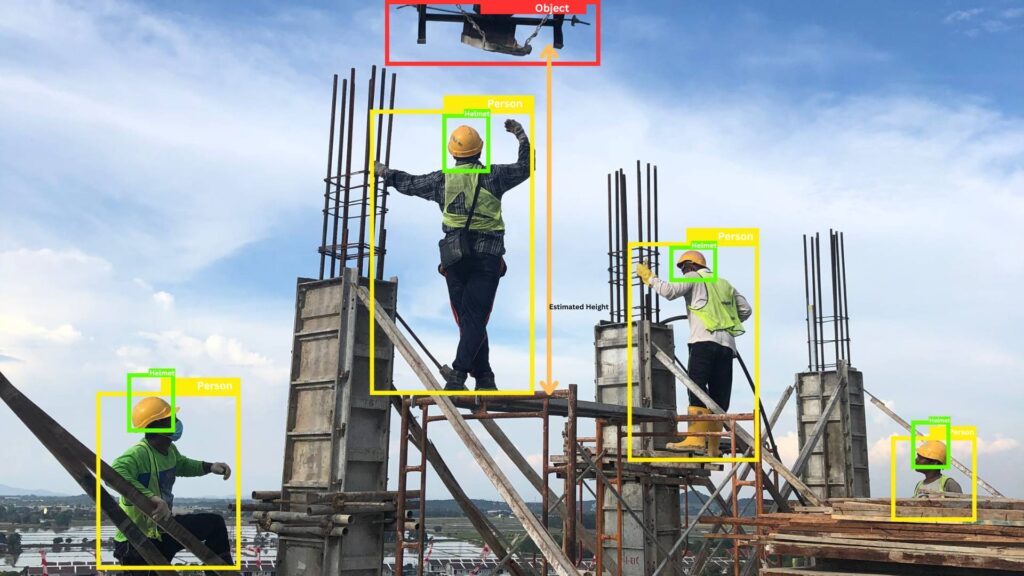
In the construction industry, computer vision can play a crucial role in enhancing site operations and worker safety. For example, it can process visual data from surveillance cameras or drones to monitor site activities, detect potential hazards (e.g., workers operating in dangerous areas or not wearing proper safety equipment), and track the progress of construction projects in real-time.

Furthermore, computer vision can be integrated with advanced technologies like augmented reality (AR) or mixed reality (MR) systems, allowing construction professionals to overlay digital information and instructions directly onto their visual field, enhancing situational awareness and enabling more efficient and safer operations.

By leveraging the power of computer vision, the construction industry can unlock new levels of operational efficiency, productivity, and worker safety, ultimately driving innovation and sustainable growth within this vital economic sector.

How does Computer Vision contribute to the construction industry?

Computer vision, an AI-driven technology, plays a pivotal role in revolutionizing the construction industry by enabling automation, enhancing safety measures, boosting productivity, and improving quality control across various aspects of construction management. This cutting-edge AI and machine learning (ML) service has the potential to transform the way construction projects are executed, monitored, and managed.

  • Safety Management:

    One of the most significant contributions of AI-driven computer vision technology is its ability to aid in safety monitoring on construction sites. By leveraging advanced image and video analysis techniques powered by AI and ML, these systems can detect potential hazards, ensure compliance with safety protocols, and prevent accidents through real-time monitoring. This proactive approach to safety management not only protects workers but also helps mitigate risks, reduce downtime, and minimize costly accidents, making AI in the construction industry a game-changer.
  • Progress Monitoring:

    Computer vision technology, facilitated by cloud computing and AI/ML services, offers a powerful solution for real-time progress tracking in construction projects. Project managers can leverage this technology to monitor construction activities, identify delays or bottlenecks, and optimize project timelines efficiently. By providing accurate and up-to-date information on project progress, AI-driven computer vision enables data-driven decision-making and facilitates proactive measures to keep projects on schedule.
  • Productivity Tracking:

    Automating monitoring processes is a game-changer for productivity tracking in the construction industry. AI-powered computer vision systems can analyze visual data to measure productivity metrics, identify inefficiencies, and optimize resource allocation. This data-driven approach not only enhances project efficiency but also provides valuable insights for continuous improvement and streamlining of construction processes.
  • Quality Control:

    Ensuring adherence to construction standards and maintaining high-quality workmanship is crucial in the construction industry. AI-driven computer vision technology assists in quality control by detecting defects, assessing workmanship, and ensuring compliance with construction standards. This automated quality assurance process helps identify and address issues early, reducing rework and minimizing costly repairs or replacements.
  • Data Analysis and Insights:

    The vast amount of visual data collected from construction sites through cameras, drones, and other imaging devices can be leveraged by AI-powered computer vision systems to provide valuable insights. By analyzing images and videos, these cloud-based AI/ML services can generate comprehensive data reports, enabling data-driven decision-making, risk assessment, and performance evaluation in construction projects.

The integration of AI-driven computer vision technology into the construction industry has the potential to revolutionize construction management practices, enhancing safety, productivity, quality, and overall project efficiency. As this AI and ML service continues to evolve and become more sophisticated, its impact on the construction industry is expected to grow, paving the way for more innovative and sustainable construction practices leveraging the power of cloud computing and AI/ML technologies.

Implementing Computer Vision in Your Construction Business

Implementing computer vision technology in your construction business is a strategic decision that can yield significant benefits, revolutionizing various aspects of your operations. However, the integration process demands careful planning, execution, and collaboration with experienced technology partners. Here’s a comprehensive guide to help you successfully adopt computer vision in your construction business:

Here are steps to Integration:

  1. Define Your Goals:

    Clearly identify the areas where you aim to leverage computer vision technology, such as safety monitoring, progress tracking, productivity analysis, or quality assurance. Prioritize your goals based on your business needs and pain points.
  2. Assess Your Infrastructure:

    Evaluate your existing infrastructure, including cameras, sensors, computing resources, and data management systems. Determine if upgrades or expansions are necessary to support the seamless integration of computer vision solutions.
  3. Select the Right Solution:

    Conduct thorough research and evaluate different computer vision solutions tailored to the construction industry. Consider factors like scalability, accuracy, reliability, integration capabilities, user-friendliness, and customization options.
  4. Pilot Testing:

    Implement a pilot program to assess the performance and effectiveness of the chosen computer vision solution in a controlled environment. This will help identify potential issues, fine-tune the system, and ensure a smooth full-scale implementation.
  5. Data Integration:

    Ensure the computer vision system can seamlessly integrate with your existing data management systems, such as project management software, enterprise resource planning (ERP) systems, or building information modeling (BIM) platforms, enabling efficient data exchange and streamlined workflows.
  6. Train Your Team:

    Provide comprehensive training to your team members who will interact with or manage the computer vision system. Ensure they understand its capabilities, limitations, and best practices for optimal utilization and data interpretation.
  7. Roll-out and Continuous Improvement:

    After successful pilot testing, gradually roll out the computer vision solution across your construction projects. Continuously monitor its performance, gather feedback from users, and implement improvements or upgrades as needed to maximize its effectiveness.

How to Choose the Right Solution

When selecting a computer vision solution, consider factors such as scalability, accuracy, reliability, integration capabilities, user-friendliness, and customization options. Look for solutions that align with your specific construction processes and requirements, enabling seamless integration and long-term scalability.

Focus on Partnership and Support

Implementing computer vision technology is a significant undertaking, and partnering with experienced technology providers can be invaluable. Look for vendors with expertise in the construction industry, offering professional services, comprehensive training, and ongoing support.

Seek vendors that provide installation, configuration, and customization services to ensure a smooth implementation tailored to your unique needs. Additionally, prioritize providers that offer reliable support, regular software updates, and consulting services, along with AI prompt assistance, to help your team effectively utilize the AI-driven computer vision solution and maximize its benefits over time.

Carefully evaluating and selecting the right AI-driven computer vision solution, and partnering with experienced technology providers, your construction business can successfully implement this cutting-edge technology. This strategic investment will unlock new levels of safety, productivity, quality control, and efficiency, driving innovation and sustainable growth in your construction operations.

Conclusion

Integrating computer vision technology into heavy equipment safety systems provides significant benefits for businesses and workers by enhancing worker safety and reducing accident risks. This advanced technology can detect blind spots, power collision avoidance systems, analyze operator behavior for fatigue or distraction, enable real-time monitoring and alerting of unsafe conditions, develop smart control systems, optimize site planning and design, and ensure proper personal protective equipment usage. By leveraging computer vision, businesses demonstrate their commitment to environmental, health, and safety standards, creating a safer work environment. EHS managers can utilize the data and insights gathered to inform safety training, improve protocols, reduce accidents and injuries, and improve overall EHS compliance. If interested in exploring how computer vision can benefit your heavy equipment safety systems, request a free demo to experience the potential of this cutting-edge technology.

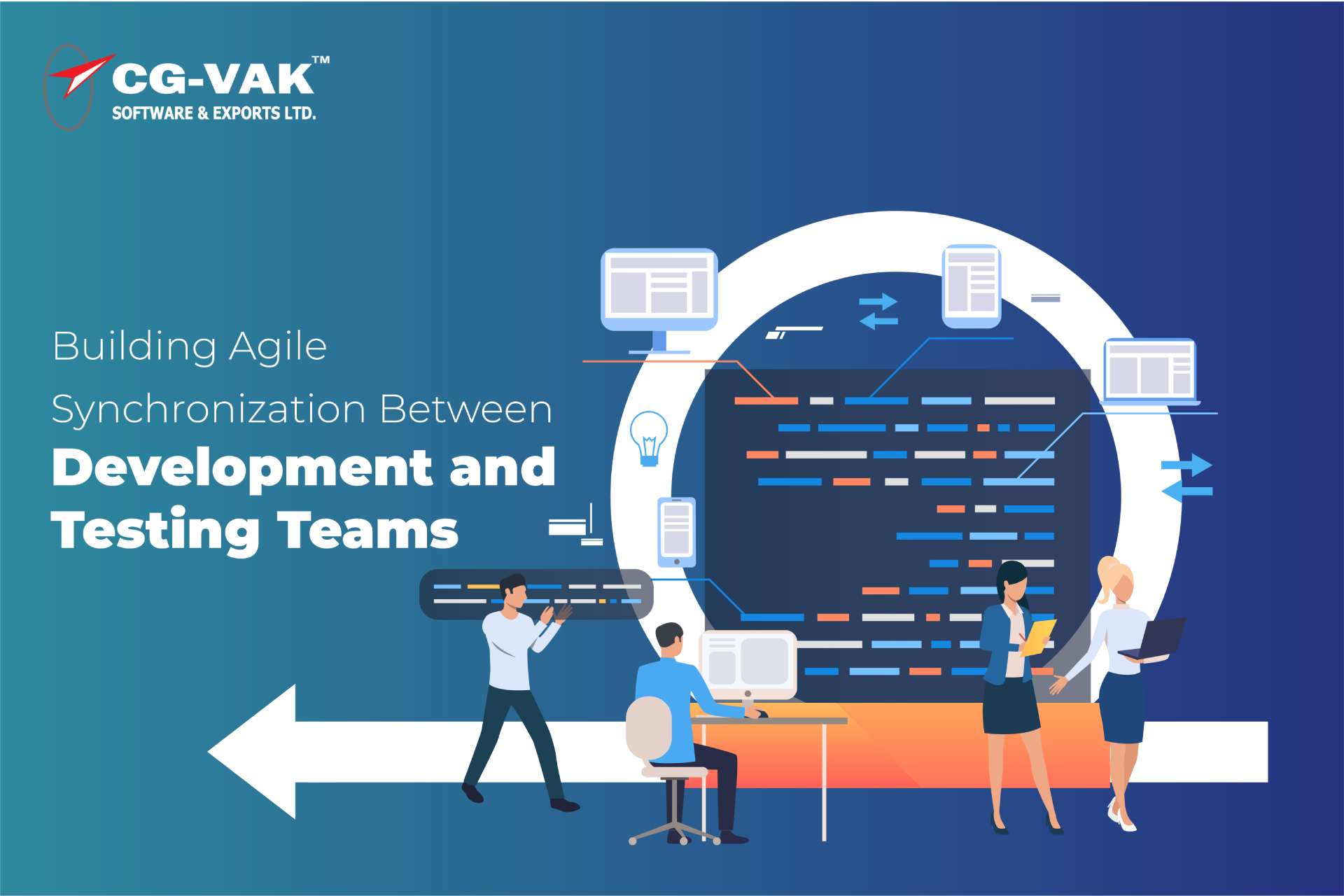
Building Agile Synchronization between Development and Testing Teams

So, you know how traditional software development can sometimes feel like you’re stuck on a one-way street?

Well, Agile methodologies swoop in to save the day with their emphasis on flexibility and collaboration!

nstead of following a rigid plan, Agile teams work iteratively, constantly evolving their solutions through teamwork and feedback. However, blending their skills into one smooth workflow. In the fast-paced world of Agile, where changes happen faster than you can say “sprint,” this collaboration is key.

Think of it like this: developers are the architects, crafting the software with precision and flair, while testers are the quality assurance pros, meticulously checking every nook and cranny to ensure everything runs like a well-oiled machine. When these two teams work together seamlessly, magic happens. Each sprint brings forth a product that’s not only on point with the specs but also super reliable, user-friendly, and just downright awesome.

This blog is all about shining a light on development and testing teams in the Agile world. We’re talking about how they come together to deliver solutions that aren’t just about lines of code but about making a real impact with quality, relevance, and a sprinkle of innovation. So buckle up, because we’re about to take you on a journey through the wonderful world of Agile collaboration and agile testing methodology!

The Essential Relationship Between Development and Testing in Agile Environments

In Agile environments, the essential relationship between development and testing teams serves as the backbone of the entire process. Development teams, serving as the architects, translate ideas into functioning software with creativity and precision.

Meanwhile, testing teams, acting as the quality guardians, meticulously inspect every aspect of the product to ensure it meets standards and expectations. What makes this relationship truly special is the seamless collaboration between the two.

Agile methodologies thrive on constant feedback and iteration, and this collaboration ensures that feedback loops are tight and effective. Developers rely on testers to provide timely insights into how their code performs in real-world scenarios, while testers depend on developers to address issues promptly and efficiently.

Together, they form a symbiotic partnership that drives continuous improvement, resulting in software that not only meets requirements but exceeds expectations in terms of quality, usability, and reliability in Agile testing environments.

Understanding the Unique Contributions of Development and Testing Teams

Within agile development methodology, the development team isn’t just a bunch of individuals coding in isolation. They serve as the masterminds behind the product, translating requirements into tangible software. Their role is diverse and dynamic, revolving around several crucial responsibilities:

  1. Requirement interpretation:

    They collaborate closely with product owners to break down user stories into technical tasks, guiding the project’s direction.
  2. Design and architecture:

    Crafting system architecture that aligns with business objectives and scalability.
  3. Coding and building:

    Writing clean, efficient code to bring the product to life.
  4. Unit Testing:

    Conducting initial quality checks to ensure the code functions correctly.
  5. Continuous integration and deployment:

    Frequently integrating their work to maintain the product in a deployable state, often leveraging automation tools to streamline processes in agile software development.

The Testing Team’s Role in Agile Projects

Within Agile methodology steps, the testing team holds a significant position, often seen as the guardians of quality. Their responsibilities stretch beyond mere bug detection, encompassing the following key roles, all in line with agile principles:

  • Establishing acceptance criteria:

    Testers collaborate with stakeholders to define clear, measurable success benchmarks, fostering a shared vision of project objectives—a crucial aspect in agile methodology steps.
  • Test planning and execution:

    Testers meticulously plan and execute tests focusing on functionality, performance, security, and usability, striving for top-notch products—leveraging their agile training for teams.
  • Implementation of test automation:

    Within Agile environments, testers leverage automated frameworks to expedite testing processes and bolster efficiency—emphasizing the importance of test automation in agile projects.
  • Feedback provision and documentation

    : Beyond pinpointing issues, testers provide constructive feedback and meticulously document their findings, ensuring transparent communication and continuous improvement efforts—demonstrating the integration of agile principles into their daily practices.

Proven Strategies for Enhancing Collaboration Across Teams

These strategies are tailored to promote Agile Harmony, ensuring a seamless, efficient, and productive partnership that propels project success. Strategic cross-functional meetings anchor effective collaboration, emphasizing agile methodology principles and supporting the agile development process.

These sessions involve development and testing teams discussing progress, tackling challenges, and brainstorming solutions to align their goals. Productive meetings require a clear agenda, active participation, and a focus on solutions, all in line with agile principles.

Agile teams thrive on shared goals, diminishing the divide between creation and validation, in adherence to agile principles and agile software testing practices. Joint retrospectives offer a platform for mutual feedback and learning, celebrating collective successes and addressing challenges, thereby reinforcing agile principles and promoting continuous testing. These collaborative retrospectives foster a culture of continuous improvement and teamwork, reinforcing Agile principles and supporting software testing efforts.

Consistent and clear communication is vital in Agile teams to ensure alignment and reduce misunderstandings, reflecting agile principles and supporting continuous testing. This can be achieved through various channels like daily stand-ups, chat groups, or email threads, ensuring they are accessible, monitored, and effectively used, in alignment with agile principles and software testing best practices.

Open and transparent communication fosters trust and cohesion among team members, enhancing overall project performance and reflecting agile principles and continuous testing methodologies.

Addressing Common Challenges in Uniting Development and Testing Teams

Uniting development and testing teams can be a daunting task, often fraught with challenges that stem from differences in approach, priorities, and communication styles within the context of agile development methodology. However, overcoming these hurdles is crucial for achieving seamless collaboration and ensuring the success of Agile projects. Here are some common challenges and strategies to address them while incorporating learning automation testing:

  • Communication Gaps:

    Miscommunication or lack of communication between development and testing teams can lead to misunderstandings and delays within the agile process. To bridge this gap, establish regular communication channels such as daily stand-up meetings or collaboration tools like Slack. Encourage open dialogue and active listening to ensure everyone is on the same page.
  • Misaligned Goals:

    Development and testing teams may have different priorities and objectives, leading to conflicting agendas within the agile process. Aligning goals and fostering a shared understanding of project objectives is essential. Hold joint planning sessions where teams can collaborate on defining project milestones and success criteria.
  • Resource Constraints:

    Limited resources, such as time and manpower, can pose challenges for both development and testing teams within the agile process. Prioritize tasks based on project requirements and allocate resources efficiently. Consider implementing automation tools for repetitive testing tasks to streamline processes and save time, while also learning automation testing techniques.
  • Quality Assurance:

    Ensuring product quality while maintaining development speed can be a balancing act within the agile process. Implement a robust quality assurance process that includes both manual and automated testing. Encourage collaboration between developers and testers from the early stages of development to identify and address issues proactively.
  • Cultural Differences:

    Development and testing teams may have different work cultures or methodologies, leading to friction within the agile process. Foster a culture of collaboration and mutual respect by organizing team-building activities and promoting knowledge sharing. Provide training and support to ensure everyone is familiar with Agile principles and practices, including learning automation testing methodologies.

By addressing these common challenges and fostering a collaborative environment, development and testing teams can work together effectively within the agile development methodology to deliver high-quality software products that meet customer needs and expectations.

Conclusion

Agile harmony represents a paradigm shift in software development, effectively erasing the traditional barriers that separate development and testing teams. It’s a transformative approach that promotes synergy and collaboration by creating an environment of continuous integration, open communication, and shared responsibility. In this dynamic setting, both teams operate in unison, much like a well-coordinated symphony, where every instrument plays its part to create a harmonious melody.

The principles of Agile empower teams to adapt and respond to changes swiftly, ensuring that the software development process remains flexible and efficient. By embracing Agile methodologies, organizations can streamline their workflows, enhance collaboration, and deliver high-quality software products more effectively.

In today’s rapidly evolving digital landscape, businesses face increasing pressures to innovate and stay competitive. The fusion of development and testing through Agile methodologies represents a necessary evolution in this pursuit of excellence and innovation. It enables organizations to navigate the complexities of modern software development with agility and efficiency, ultimately driving success in the digital era.

The Impact of Smart Invoice Processing with AI, ML in Banking & Finance

Banks and financial institutions are constantly seeking innovative solutions to streamline operations and enhance efficiency. One area that is experiencing a remarkable transformation is invoice processing, where automation in banking and finance is revolutionizing traditional processes. Smart invoice processing, powered by advanced technologies such as Intelligent Process Automation (IPA), Machine Learning (ML), and Predictive analytics.

(RPA), is leveraging these cutting-edge technologies to automate and optimize the invoice processing workflow, automating billing and invoicing functions.

By harnessing the power of IPA, ML, and RPA, the banking and finance industries can revolutionize their invoice processes, achieving unprecedented speed, accuracy, and time/cost savings. These technologies enable intelligent data extraction, validation, and processing, reducing manual efforts and minimizing errors. With smart invoice processing solutions, financial institutions can streamline their operations, improve operational efficiencies, and enhance customer satisfaction, reaping the benefits of invoice automation.

In this insightful blog, we will delve into the transformative impact of Intelligent Automation (IA) on invoice processing automation.

Understanding Invoice Processing in Banking and Finance

Traditionally, invoice processing in banking and finance has been a labor-intensive and time-consuming task, often plagued by manual errors, delays, and inefficiencies. However, with the advent of advanced technologies such as Intelligent Process Automation (IPA), Machine Learning (ML), and Robotic Process Automation (RPA), the landscape of invoice processing is undergoing a transformative shift.

These cutting-edge technologies, including AI for document processing and RPA for banking and finance, enable the automation of various invoice processing steps, streamlining the entire workflow. Intelligent data extraction capabilities facilitated by intelligent processing automation solutions facilitate accurate data capture from invoices, while ML algorithms validate and process the extracted information. RPA automates repetitive tasks, minimizing human intervention and increasing efficiency.

By leveraging these technologies, banks and financial institutions can achieve significant cost savings, improve accuracy, enhance transparency, and ensure compliance with regulatory requirements. Automated invoice processing not only reduces processing times but also provides real-time visibility into the entire workflow, enabling better decision-making and resource allocation.

How Does It Benefit Accounting Teams?

Invoice automation offers numerous benefits to organizations, particularly in the banking and finance sector, where streamlining operations and ensuring accuracy are paramount. With the advent of technologies like Ai in finance, Machine learning in invoice processing, and Robotic process automation, organizations can leverage intelligent processing automation solutions to revolutionize their invoice processing workflows. Here are some of the key benefits of invoice automation:

  1. Increased Efficiency and Productivity:

    Manual invoice processing is a time-consuming and error-prone task. By automating the entire workflow, organizations can significantly reduce the time and effort required for invoice processing. Automated data extraction, validation, and processing eliminate the need for manual data entry, freeing up valuable resources that can be redirected toward more strategic initiatives.
  2. Enhanced Accuracy and Compliance

    : Human error is a common challenge in manual invoice processing, leading to inaccuracies, delays, and potential compliance issues. Intelligent processing automation, combined with ai for document processing and RPA for banking and finance, ensures accurate data extraction and validation, minimizing errors and improving overall data quality. This heightened accuracy helps organizations maintain compliance with regulatory requirements and industry standards.
  3. Cost Savings

    : Invoice automation streamlines processes and reduces the need for manual labor, resulting in substantial cost savings for organizations. By minimizing errors and optimizing workflows, organizations can reduce operational costs associated with invoice processing, such as staffing expenses, error rectification costs, and late payment penalties.
  4. Improved Visibility and Control:

    Automated invoice processing solutions provide real-time visibility into the entire workflow, enabling better tracking and monitoring of invoices. Organizations can easily identify bottlenecks, monitor approval statuses, and gain insights into spending patterns. This enhanced visibility allows for better control over the process, enabling more informed decision-making and effective resource allocation.
  5. Faster Processing and Payment Cycles:

    By eliminating manual tasks and automating various stages of the invoice processing workflow, organizations can significantly accelerate the entire process. Invoices can be processed and approved more quickly, leading to faster payment cycles. This not only improves relationships with vendors and suppliers but also helps organizations take advantage of early payment discounts and avoid late payment penalties.
  6. Scalability and Adaptability

    : As businesses grow and transaction volumes increase, manual invoice processing becomes increasingly challenging and difficult to scale. Automated solutions, however, can easily handle larger volumes of invoices without compromising efficiency or accuracy. Additionally, these solutions can adapt to changing business requirements, regulatory updates, or process modifications, ensuring long-term sustainability and flexibility.
  7. Enhanced Security and Audit Trail

    : Automated invoice processing solutions often incorporate robust security measures, such as role-based access controls, data encryption, and audit trails. These features help protect sensitive financial information and ensure compliance with data privacy regulations. Furthermore, the audit trail functionality provides a comprehensive record of all invoice processing activities, enabling better accountability, and facilitating audits.
  8. Predictive Analytics and Insights:

    By leveraging Machine learning and Predictive analytics, organizations can gain valuable insights into their accounts payable and accounts receivable processes. These technologies can analyze historical data, identify patterns, and predict future trends, enabling organizations to optimize cash flow management, negotiate better payment terms, and make informed decisions regarding supplier relationships.

By embracing invoice automation, organizations in the banking and finance sector can streamline operations, reduce costs, enhance accuracy, and improve overall efficiency. The benefits extend beyond the invoice processing workflow, contributing to better financial management, stronger vendor relationships, and a competitive advantage in the rapidly evolving business landscape.

How Invoice Automation Can Help Your Business

Invoice automation processing benefits various stakeholders within an organization, including:

  1. Accounts Payable (AP) Department:

    The AP department is the primary beneficiary of invoice automation processing. It relieves AP staff from the tedious and error-prone tasks of manual data entry, invoice matching, and approval routing. With automated data extraction, validation, and processing, the AP team can focus on more value-added activities, such as vendor management, cash flow optimization, and strategic financial planning.
  2. Finance and Accounting Teams:

    Automated invoice processing ensures accurate and timely financial data, enabling finance and accounting teams to generate accurate financial reports, perform reliable forecasting, and make informed business decisions. The enhanced visibility and audit trails provided by automation solutions facilitate better financial controls and compliance with regulatory requirements.
  3. Procurement and Vendor Management:

    Invoice automation streamlines the invoice approval process, enabling faster payment cycles and improving relationships with vendors and suppliers. Automated solutions can also facilitate vendor onboarding, contract management, and spend analysis, supporting strategic procurement decisions.
  4. IT and Operations Teams:

    Automated invoice processing solutions often integrate with existing enterprise resource planning (ERP) systems, financial applications, and other business software. This integration benefits IT and operations teams by reducing manual data entry, minimizing errors, and ensuring seamless information flow across different systems.
  5. Auditors and Compliance Teams:

    The audit trails, data accuracy, and enhanced visibility provided by invoice automation processing facilitate efficient audits and ensure compliance with industry regulations and internal policies. Auditors can easily access and review invoices, approvals, and payment information, streamlining the audit process.
  6. Vendors and Suppliers:

    By enabling faster payment cycles and reducing disputes arising from manual errors, invoice automation processing improves relationships with vendors and suppliers. It fosters trust, transparency, and better collaboration between organizations and their business partners.

Overall, invoice automation processing benefits various stakeholders within an organization by improving operational efficiency, enhancing financial controls, reducing costs, and fostering better relationships with vendors and suppliers.

How CG-VAK is implementing Automation with AI in Invoice Processing?

CG-VAK is implementing automation with AI in invoice processing through a structured approach that leverages Intelligent Automation (IA) and various AI technologies. Here’s how we implement the solution:

Check Mailbox for New Emails: The initial phase involves training a bot to fetch invoices by accessing an assigned mailbox and examining incoming emails based on criteria such as subject lines, sender details, and other relevant attributes.

Identifying & Evaluating Attachments: Once the bot identifies emails containing attachments, it determines whether the file is a PDF and checks if its size falls within the designated limit. If the email doesn’t have any attachments, it is disregarded, and multiple attachments are handled separately.

Keyword Analysis: The bot compares line items with predefined keywords between invoices and related documents. If an attachment is unrecognized, the bot moves the email to a training folder. If the document is recognized, the bot checks for specific keywords within the PDF.

Field Extraction and Confidence Check: After recognizing the keywords, the bot extracts data from the PDF and assesses the confidence score of the extraction process.

Process Purchase Order (PO) Status & Extraction Errors: The bot then checks the status of the purchase order (PO) automation associated with the extracted data and moves the extracted data to the appropriate folders. If the extraction process fails, the bot moves the email to an Error folder for further review.

By implementing this structured approach, leveraging AI technologies such as Optical Character Recognition (OCR), Natural Language Processing (NLP), and Machine Learning (ML) to automate the invoice processing workflow effectively.

The solution streamlines the entire process, from email retrieval and attachment handling to data extraction, validation, and error handling, ensuring accuracy, efficiency, and scalability.

Conclusion

The adoption of Intelligent Automation (IA) is catalyzing a transformative shift in invoice processing within the banking and finance sector. This cutting-edge technology is ushering in a new era of unprecedented efficiency, heightened accuracy, and substantial cost optimization. Financial institutions that proactively embrace Intelligent Automation (IA) solutions are well-positioned to gain a competitive edge by streamlining their operations, bolstering compliance adherence, and delivering exceptional customer experiences. In the rapidly evolving financial landscape, where agility and innovation are paramount, the integration of IA represents a strategic imperative for institutions seeking to future-proof their operations and thrive amidst dynamic market conditions. Contact our experts for Artificial intelligent and machine learning solutions